
A single funeral notice can give you more than a death certificate: the date, the address, the names of every surviving child, where married daughters were living, and which church the family belonged to. Trove, the National Library of Australia’s free newspaper archive, holds millions of them.
The catch is that Trove searches the computer-read text of old newspapers, not the page you see. Misread letters, initials and old naming customs mean a plain name search often misses the notice you want. This guide shows how to search properly.
Quick answer: Search Trove’s Newspapers & Gazettes with the name in quotation marks, then filter Category to Family Notices and narrow by date and state. If nothing turns up, try initials, the husband’s name for married women and spelling variants, or browse the newspapers for the days after the death.
What family notices can tell you
- Birth notices: the parents’ names (often the mother’s maiden name), the date and sometimes the hospital or address.
- Marriage and engagement notices: both families’ names and home towns.
- Death notices: date of death, age, address and often a list of relatives.
- Funeral notices: where and when the funeral was held, and who was invited, which can name lodges, workplaces and in-laws.
- “In memoriam” notices: placed on anniversaries, they can confirm a death year and show who was still grieving years later.
Step 1: Search the name as a phrase
Put the name in double quotation marks, such as “Henry Lawson”. Without them, Trove returns every page where “Henry” and “Lawson” appear anywhere, which for a common name is hopeless.
To catch middle names or reversed order (“Lawson, Henry”), add a tilde and a number after the closing quote: “Henry Lawson”~2 allows up to two words between or around the names. Use ~0 when you want only the exact name.
Step 2: Filter to Family Notices
Run the search in Newspapers & Gazettes, then use the Category filter and choose Family Notices. This removes news stories, advertisements and shipping lists, leaving just the births, marriages, deaths and funerals.
Then narrow by date range and state. If you know roughly when someone died, a two-year window either side is plenty.
Step 3: Try the names as they were printed
This is where most searches fail. Old newspapers rarely printed names the way we’d search for them.
- Initials: “H. Lawson” or “H. A. Lawson” were far more common than full names. Search “Henry Lawson” OR “H Lawson”.
- Married women: a wife usually appears under her husband’s name, as “Mrs. W. A. Smith”. Search for her husband’s initials as well as her own name.
- Nicknames: try Bob for Robert, Bill for William, Pat for Patrick, Nell for Ellen.
- Spelling variants: an asterisk catches different endings, so Clark* finds Clark, Clarke and Clarkson.
Step 4: Add a place to cut out namesakes
Common names bring hundreds of results. Add the town or district with AND: “John Murphy” AND Wagga. This is especially useful for country families, whose notices often appeared in both the local paper and a city daily.
If someone famous shares your ancestor’s name, use NOT to exclude them, but use it carefully: it also removes any notice that happens to mention the excluded word.
Try it: Henry Lawson’s death in 1922
Henry Lawson died in Sydney on 2 September 1922. To see these techniques in action, search Trove Newspapers for “Henry Lawson”, filter Category to Family Notices, and set the date range to September 1922.
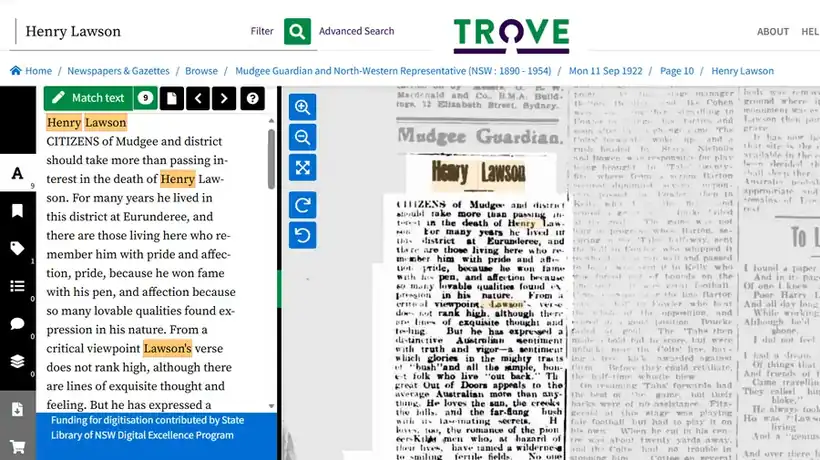
Run the phrase search without the category filter first, and you’ll see why the filter matters. “Henry Lawson” in quotation marks returns tens of thousands of results, and the top ones are news articles and tributes rather than notices. The Mudgee Guardian ran a tribute on 11 September 1922, noting he “for many years lived in this district at Eurunderee”, and the Albany Despatch in Western Australia reprinted a Melbourne Age piece a week later.
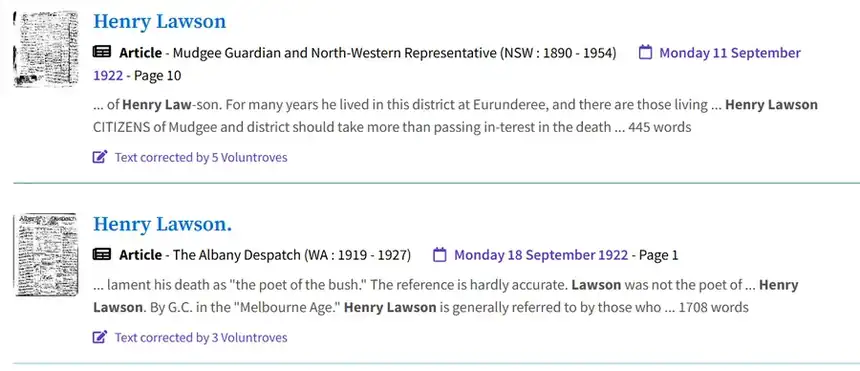
For a well-known person, news coverage swamps everything else. For your own ancestor it’s usually the opposite: the family notice is the only mention. Either way, the Family Notices filter is what gets you to the notice.
Those two results also show something useful: a local paper in the district where someone grew up may cover their death in more personal detail than the city papers. If your ancestor moved, search the papers of the town they came from too.
Step 5: When the notice is there but the search misses it
Trove’s text was read by a computer, and faded or smudged print often comes out as nonsense. “Lawson” might have become “Lawsou” or “Lawsen”. If you know the date of death, skip the search entirely:
- Browse to the newspaper for the day after the death, and the next few days.
- Find the Family Notices page, usually near the front of city dailies.
- Read the notices by eye.
When you find a misread notice, correct the text. It takes a minute, it makes the notice findable for everyone else, and it’s how Trove gets better.
Step 6: Save what you find
Create a free Trove account and save each notice to a list for that ancestor. Add a note with who the person is and the search terms that worked. You can also tag a notice with a married woman’s maiden name, so she can be found under her own name later.
Still nothing?
- Check the Ryerson Index, a free index to Australian death and funeral notices, which covers many papers and years Trove doesn’t.
- Not every newspaper or year is on Trove yet. Local libraries and historical societies often hold the missing papers on microfilm.
- Confirm the death date first with the NSW BDM index, then browse the papers for that week.
Related: How to search NSW Births, Deaths and Marriages for free · Free Records Directory · All Newspapers & Trove guides
Sources: National Library of Australia: Newspapers for family history · State Library of South Australia: Searching Trove · Australian Dictionary of Biography: Henry Lawson · Trove